 EN
EN


كيف تستخدم أكشاك الحكومة لتقديم خدمات عامة فعّالة: دليل شامل للحوكمة الرقمية على مدار ٢٤ ساعة/٧ أيام
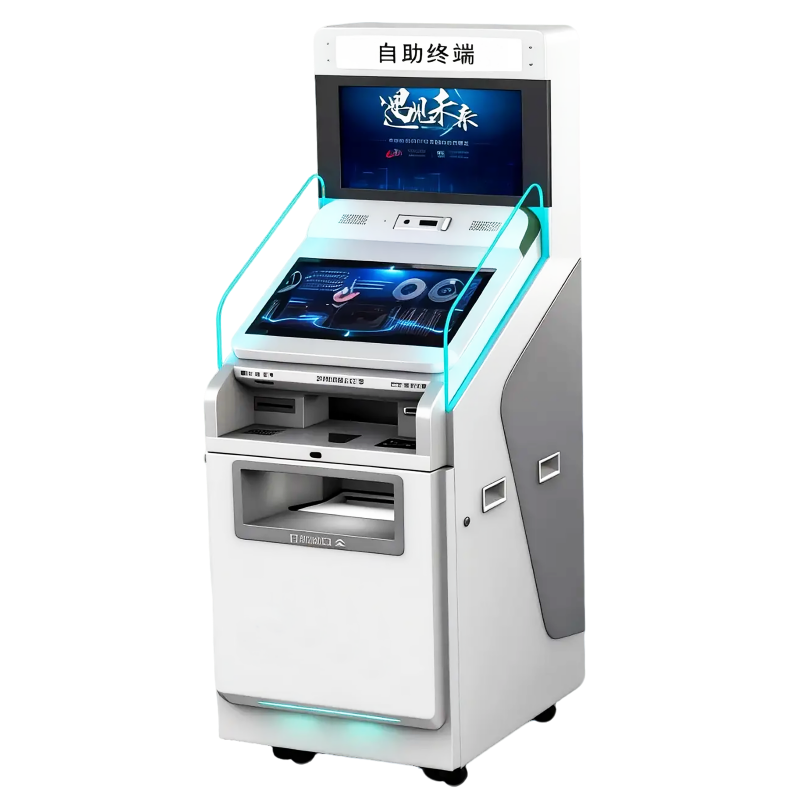
في المشهد المتطوّر بسرعة للاقتصاد الرقمي لعام ٢٠٢٦، أكشاك الحكومة قد تجاوزت أصولها كأداة بسيطة لإدارة الطوابير. واليوم، تُعتبر هذه الأجهزة بوابة متطورة متعددة الوظائف للوصول إلى الخدمات العامة، وقد صُمّمت لسد الفجوة بين البنية التحتية الرقمية للحكومة والواقع المادي للمواطنين. ومع سعي البلديات نحو تحقيق حالة "المدينة الذكية"، أصبحت هذه المحطات ضرورية لضمان إتاحة الخدمات عالية القيمة—مثل تجديد الهوية وتوزيع الاستحقاقات الاجتماعية—بطريقة آمنة وفعّالة.
في حلول الكشك ، وخلال عقودٍ عديدة، ركّزنا على هندسة الأجهزة التي تُشغّل هذه التحوّلات المدنية. واستنادًا إلى خبرتنا الواسعة في تركيب آلاف الوحدات عبر بيئات إدارية متنوعة، يقدّم هذا الدليل تحليلًا متعمقًا لكيفية الاستفادة الفعّالة من جهاز أكشاك الحكومة لتجاوز البيروقراطية وتجربة مستقبل الخدمات العامة.
١. تشريح جهاز الكشك الحكومي الحديث
لاستخدام أكشاك الحكومة بطريقة فعّالة، يُعد فهم المكونات عالية التقنية التي تجعل هذه الآلات أكثر قدرةً من جهاز كمبيوتر منزلي أو هاتف ذكي عادي أمراً مفيداً.
الواجهة التفاعلية
تستخدم الكشك الحديثة شاشات لمس مقاومة للتلف وبإضاءة عالية. وفي عام ٢٠٢٦، تكون هذه الواجهات مزوَّدة بـ محرك بالذكاء الاصطناعي معالجة اللغة الطبيعية (PLT ). وبدلاً من البحث عبر مجلدات معقَّدة، يمكن للمستخدم أن ينقر ببساطة على أيقونة الميكروفون ويطرح السؤال: "كيف أدفع ضريبة أملاكي؟" فتنتقل الكشك فوراً إلى الوحدة الصحيحة.
حزمة الأمان والمصادقة
يُعتبر الأمان حجر الزاوية في أي أكشاك الحكومة . هذه الوحدات مزودة بـ:
-
ماسحات ضوئية متقدمة للوثائق : قادرة على التحقق من أصالة جوازات السفر ورخص القيادة باستخدام الضوء فوق البنفسجي والضوء تحت الأحمر.
-
مستشعرات حيوية : تشمل ماسحات بصمات أصابع معتمدة من مكتب التحقيقات الفيدرالي (FBI) وكاميرات للتعرف ثلاثي الأبعاد على الوجه لمنع سرقة الهوية.
-
وحدات التشفير : تستخدم رقائق وحدة المنصة الموثوقة (TPM) لضمان تشفير بياناتك الشخصية فور إدخالها.
أجهزة الإصدار والدفع المادية
وخلافًا لموقع ويب، يمكن للكشك تقديم خدمة التوفير المادي.
-
طابعات آمنة : لإصدار التصاريح المؤقتة وبطاقات الهوية أو الشهادات المعتمدة على ورق عالي الأمان.
-
محطات الدفع يقبل الدفع غير المتلامس وفق معيار EMV (مثل Apple Pay وGoogle Pay)، وفي العديد من النماذج، يحتوي على أنظمة آمنة لإعادة تدوير النقود النقدية لخدمة المواطنين غير المتعاملين مع البنوك.
2. خطوة بخطوة: تنفيذ الخدمات العامة الشائعة
باستخدام أكشاك الحكومة تم تصميمه ليكون سهل الاستخدام والفهم، لكن اتباع هذه الخطوات يمكن أن يقلل من وقت الزيارة المكتبية الذي يستغرق ساعتين إلى معاملة تستغرق ثلاث دقائق فقط.
الخطوة 1: التحضير قبل المعاملة
قبل الاقتراب من الكشك، تحقق مما إذا كانت الخدمة المطلوبة تتطلب «رقم طلب» خاصًا. فتتيح العديد من الأنظمة الحديثة بدء إجراء الطلب عبر هاتفك الذكي وتوليد رمز الاستجابة السريعة رمز استجابة سريع (QR Code). ويؤدي مسح هذا الرمز ضوئيًّا عند الكشك إلى تعبئة بياناتك تلقائيًّا، بحيث يبقى فقط التحقق الآمن من الهوية والدفع ليُنفَّذا شخصيًّا.
الخطوة 2: اختيار اللغة وخيارات الوصول
عند الوصول، تعرض الشاشة الأولى خيارات اللغة. وتتميز كشكات الحكومة المهنية عادةً بدعمها ما بين ١٠ إلى ١٥ لغة لخدمة السكان المتنوعين. بالإضافة إلى ذلك، ابحث عن أيقونة إمكانية الوصول ؛ تفعيل هذه الميزة يمكن أن يخفض واجهة الشاشة لمستخدمي الكراسي المتحركة أو يُفعّل التنقل الإرشادي الصوتي للأشخاص ذوي الإعاقات البصرية.
الخطوة الثالثة: التحقق الآمن من الهوية
هذه هي المرحلة الأهم.
-
ضع هويتك مواجهةً للأسفل على سرير الماسح الضوئي المُضاء.
-
اتبع التعليمات الظاهرة على الشاشة لإتمام «فحص الحيويّة». وسيتحقق الكاميرا من وجهك مقابل الصورة الموجودة على هويتك.
-
نصيحة الخبراء: تأكد من عدم ارتدائك قبعة أو نظارات شمسية داكنة جدًا، لأن ذلك قد يؤخر عملية التعرف على الوجه.
الخطوة الرابعة: إتمام المعاملة والتوقيع الرقمي
بالنسبة للخدمات مثل طلبات التصاريح، قد تحتاج إلى توقيع وثيقة. وتستخدم أكشاك العصر الحديث قلمًا رقميًّا سعويًّا عالي الدقة لالتقاط قانونية توقيع رقمي توقيعك، الذي يُرفق بعد ذلك ببصمة زمنية ويُشفَّر تجزئيًّا (Hashed) في السجل الحكومي لضمان عدم الإنكار.
الخطوة ٥: الإنجاز الفوري
وبمجرد اعتماد المعاملة ومعالجة الدفع، ابقَ عند المحطة حتى يتم إصدار المخرجات المادية. وقد تكون هذه المخرجات إيصالًا مطبوعًا يحتوي على رقم تتبع أو ملصق رخصة ماديًّا. وتقدِّم العديد من الأكشاك الآن خيار إرسال نسخة رقمية من الإيصال إلى بريدك الإلكتروني أو محفظتك الإلكترونية في الوقت نفسه.
٣. الخدمات عالية القيمة: ما الذي يمكنك فعله فعليًّا؟
مرونة الجهاز أكشاك الحكومة في عام ٢٠٢٦ يغطي هذا النظام تقريبًا كل الاحتياجات الإدارية.
| قطاع الخدمة | المهام الشائعة للأكشاك | الوقت الموفر (متوسط) |
| إدارة المرور والمركبات (DMV) | تجديد تسجيل المركبة، وتغيير العنوان، وطلبات استبدال اللوحات. | 90 دقيقة |
| الخدمات البلدية | دفع فواتير الخدمات (المياه/النفايات)، وتسوية مخالفات الوقوف، ودفع الضرائب العقارية. | 45 دقيقة |
| السجلات الحيوية | طلب شهادات الميلاد أو الوفاة أو الزواج والطباعة الفورية لها. | ١٠ أيام عمل |
| السلطة القضائية والمحاكم | التسجيل لخدمة هيئة المحلفين، ودفع الغرامات، وتقديم دعاوى المحاكم الصغرى. | 60 دقيقة |
| الأمان العام | الإبلاغ عن الحوادث غير الطارئة للشرطة وطلبات إجراء فحوصات السجل الجنائي. | 120 دقيقة |
٤. لماذا تعد أجهزة الكشك أكثر كفاءة: من منظور عام ٢٠٢٦
كفاءة الخدمات العامة لا تتعلق بالسرعة فحسب، بل تتعلق أيضًا بـ التوفر والدقة .
الوصول على مدار ٢٤ ساعة/٧ أيام: النموذج "الرواق"
العديد الحكومة المهنية وقد تم الآن تركيبها في "ممرات استقبال" آمنة مقاومة للعوامل الجوية، أو في "أروقة خارجية" لمباني البلديات. ويتيح ذلك للمواطنين سداد فاتورة ما أو تجديد تصريح خلال الساعة ١٠ مساءً يوم الأحد، مما يلغي الحاجة إلى أخذ إجازة من العمل خلال "ساعات الدوام الرسمي المصرفية."
دمج خدمة "الكَاتِب الافتراضي"
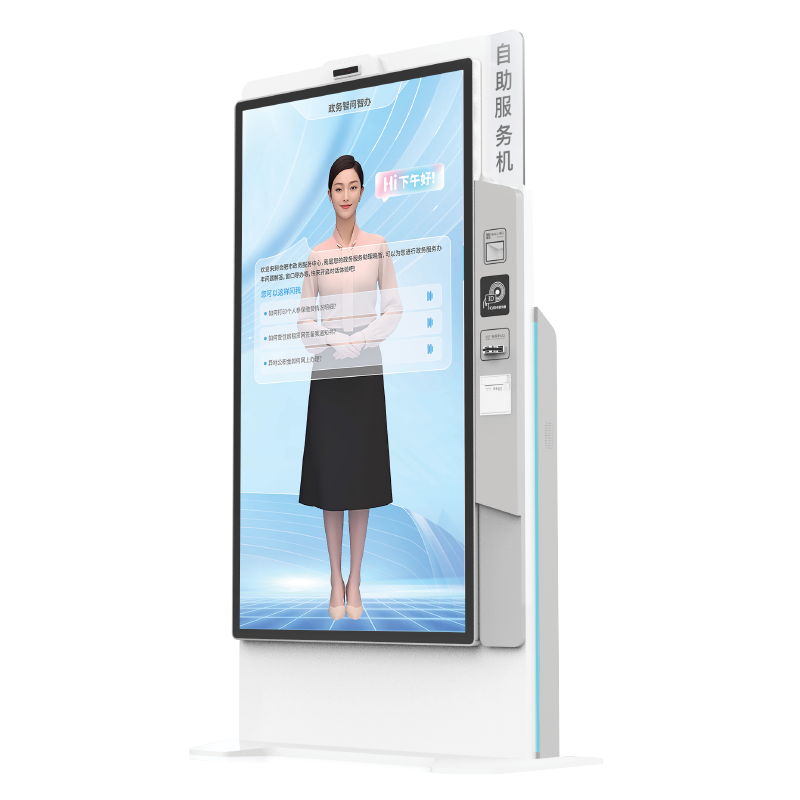
واحد من أبرز التطورات في الكفاءة هو الدعم المرئي المتكامل . وإذا واجه المواطن خطأً ما أو كانت لديه שאלה معقدة، فيمكنه الضغط على زر "المساعدة المباشرة". وعندها يظهر وكيل حكومي من مركز تحكم مركزي على شاشة الكشك عبر فيديو عالي الدقة ليُرشده. وبذلك يبقى العنصر البشري حاضرًا دائمًا، حتى في البيئة الآلية.
تخفيض "الاحتكاك الإداري"
من خلال أتمتة ٨٠٪ من المهام الروتينية (مثل المدفوعات وتجديد الصلاحيات)، لم تعد الموظفين الحكوميين يعانون من عبء المعاملات الورقية. وهذا يسمح للموظفين البشريين بالتركيز على ٢٠٪ من الحالات التي تتطلب قدراً عالياً من التعاطف أو أحكاماً قانونية معقدة، مما يحسّن جودة الإدارة العامة للجميع في المجتمع.
٥. نصائح احترافية لتحقيق أقصى كفاءة
لضمان أن تجربتك مع جهاز أكشاك الحكومة تكون سلسة، راعِ هذه النصائح الاحترافية:
-
التحقق من حالة الورق : انظر إلى شريط الحالة في الشاشة. فمعظم الأجهزة الحديثة تعرض تحذيراً مثل "غير متاح للخدمة" أو "مستوى الورق منخفض" إذا كان الجهاز غير قادر على إصدار المستند المطلوب.
-
استخدام المحافظ الرقمية : لدفع أسرع، تأكَّد من أن خدمة Apple Pay أو Google Pay جاهزة لديك. فهي أسرع بكثير وأكثر أماناً من إدخال البطاقة يدوياً.
-
مراعاة مناطق الخصوصية : غالباً ما تكون تركيبات أجهزة الكشك الاحترافية مزوَّدة بـ"سجاد خصوصية" أو حاجز زجاجي مشوش. وعليك احترام هذه المناطق لضمان أمن المستخدم الذي يسبقك.
-
أرقام المرجع هي المفتاح : إذا بدأت طلبك عبر الإنترنت، فاحتفظ دائمًا بصورة شاشة تحتوي على رقم المرجع الخاص بك. ووظيفة الكشك "البحث حسب الرقم المرجعي" هي أسرع طريقة لاسترجاع ملفك.
٦. المستقبل: كشكات ذاتية الإصلاح تعتمد على الذكاء الاصطناعي وإنترنت الأشياء
فيما ينظر إلى المستقبل، فإن أكشاك الحكومة : من خلال إنترنت الأشياء (IoT ) أجهزة الاستشعار ، أصبحت هذه الآلات الآن "ذاتية الإصلاح". فإذا حدث انسداد في الطابعة الداخلية، فيمكن للكشك غالبًا أن يعكس اتجاه الأسطوانات تلقائيًّا لتصحيح الانسداد. وإذا عجز عن ذلك، فإنه يُرسل تلقائيًّا بلاغ صيانة إلى فني محلي، وفي الوقت نفسه يوجِّه المستخدمين إلى أقرب كشك وظيفي.
وبالإضافة إلى ذلك، التحليلات التنبؤية وتسمح هذه البيانات لمخططي المدن برؤية الخدمات الأكثر طلبًا. فإذا سجَّل كشكٌ ما في حيٍّ معين زيادة بنسبة ٣٠٠٪ في عدد "طلبات تراخيص الأعمال"، فيمكن للمدينة أن تستجيب بتوفير موارد إضافية أو افتتاح فرع محلي في تلك المنطقة.
الحكم النهائي
الأنابيب أكشاك الحكومة هو الأداة المثلى للانخراط المدني الحديث. فهو يحترم وقت المواطن، ويحمي هويته، ويوفر مستوىً من الراحة كان يُحتكر سابقًا في القطاع الخاص. وبفهمك للبنية التحتية المادية (العتاد) واتباعك العمليات المبسَّطة الموضَّحة أعلاه، يمكنك تحويل ساعات الإحباط البيروقراطي إلى دقائق من الكفاءة الرقمية.
جدول المحتويات
- كيف تستخدم أكشاك الحكومة لتقديم خدمات عامة فعّالة: دليل شامل للحوكمة الرقمية على مدار ٢٤ ساعة/٧ أيام
- ١. تشريح جهاز الكشك الحكومي الحديث
- 2. خطوة بخطوة: تنفيذ الخدمات العامة الشائعة
- ٣. الخدمات عالية القيمة: ما الذي يمكنك فعله فعليًّا؟
- ٤. لماذا تعد أجهزة الكشك أكثر كفاءة: من منظور عام ٢٠٢٦
- ٥. نصائح احترافية لتحقيق أقصى كفاءة
- ٦. المستقبل: كشكات ذاتية الإصلاح تعتمد على الذكاء الاصطناعي وإنترنت الأشياء
- الحكم النهائي