 EN
EN


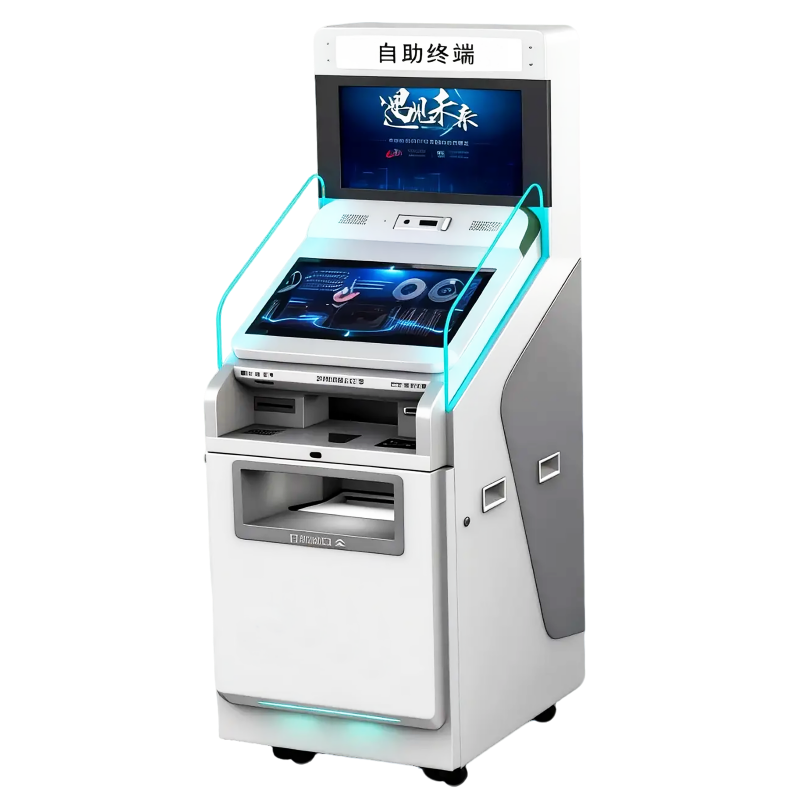
Miten käyttää hallituksen kioskeja tehokkaiden julkisten palvelujen tarjoamiseen: kattava opas 24/7 digitaaliseen hallintoon
Nopeasti kehittyvässä vuoden 2026 digitaalisessa taloudessa hallituksen kioskien on ylittänyt alkuperäisen roolinsa yksinkertaisena jonohallintatyökaluna. Tänään se toimii monitoimisena, kehittyneenä porttina julkisiin palveluihin, joka on suunniteltu kaventamaan kuilua hallituksen digitaalisen taustajärjestelmän ja sen kansalaisten fyysisen todellisuuden välillä. Kun kunnat pyrkivät saavuttamaan "älykaupungin" aseman, nämä terminaalit ovat tulleet välttämättömiksi varmistaakseen, että korkeaarvoiset palvelut – alkaen henkilöllisyystodistusten uusimisesta sosiaalietuuksien maksamiseen – ovat saatavilla, turvallisissa ja tehokkaita.
At Kioskiratkaisut , olemme viime vuosikymmeninä suunnitelleet ja kehittäneet tätä kansalaisyhteiskunnallista muutosta mahdollistavaa laitteistoa. Laajemman kokemuksen perusteella tuhansien yksiköiden asennuksesta erilaisten hallinnollisten ympäristöjen kautta tämä opas tarjoaa syvällisen analyysin siitä, miten käyttää tehokkaasti hallituksen kioskien ohittaaksesi byrokratian ja kokeaksesi julkisten palvelujen tulevaisuuden.
1. Nykyaikaisen viranomaiskioskin rakenne
Käyttääksesi hallituksen kioskien tehokkaasti on hyödyllistä ymmärtää korkean teknologian komponentit, jotka tekevät näistä koneista kykykkäämpiä kuin tavallinen kotikone tai älypuhelin.
Interaktiivinen käyttöliittymä
Nykyiset kioskit käyttävät korkean kirkkauden ja vandaaliturvattuja kosketusnäyttöjä. Vuonna 2026 nämä käyttöliittymät on varustettu AI-perustainen Luonnollisen kielen käsittelyllä (NLP ). Sen sijaan, että käyttäjä selaa monitasoisia kansioita, hän voi yksinkertaisesti napauttaa mikrofonikuvaketta ja kysyä: "Miten maksaan kiinteistöveroni?" Kioski siirtyy välittömästi oikeaan moduuliin.
Turvallisuus- ja tunnistautumispaketti
Turvallisuus on minkä tahansa hallituksen kioskien . Nämä yksiköt on varustettu:
-
Edistyneet asiakirjaskannerit : Kykenevät tarkastamaan passien ja kuljettajantutkintojen aitoutta UV- ja IR-valolla.
-
Biometriset anturit : Sisältäen FBI:n hyväksymät sormenjälkiskannerit ja 3D-kasvojen tunnistuskamerat henkilöllisyystiedon varastamisen estämiseksi.
-
Salausmoduulit : Hyödyntävät TPM (Trusted Platform Module) -piirejä varmistaakseen, että henkilökohtaiset tiedot salataan heti niiden syöttämisen jälkeen.
Jakelun ja maksun laitteisto
Toisin kuin verkkosivusto, kioski voi tarjota fyysistä täyttöä.
-
Turvalliset tulostimet : Väliaikaisten lupien, henkilöllisyyskorttien tai virallisesti vahvistettujen todistusten tulostamiseen turvapaperille.
-
Maksupäätteet hyväksyy kontaktittomat EMV-maksut (Apple Pay, Google Pay) ja monissa malleissa turvalliset käteisen kierrätysjärjestelmät pankkikorttia ei käyttäville kansalaisille.
2. Vaihe vaiheelta: Yleisimmin käytettyjen julkisten palvelujen suorittaminen
Käyttämällä hallituksen kioskien on suunniteltu intuitiiviseksi, mutta näiden vaiheiden noudattaminen voi vähentää kahden tunnin virastoasiointia kolmen minuutin tapahtumaksi.
Vaihe 1: Ennen tapahtumaa tehtävä valmistelu
Ennen kuin lähestyt kioskkia, tarkista, vaatiiko tietty palvelu "hakemustunnisteen". Monet nykyaikaiset järjestelmät mahdollistavat hakemuksen aloittamisen älypuhelimesi kautta ja "sovelluskoodin" luomisen, Qr-koodi joka skannataan kioskilla. Tämä koodi täyttää automaattisesti tiedot kioskin järjestelmään, jolloin henkilöllisyystunnistus ja maksu voidaan suorittaa vasta paikan päällä turvallisesti.
Vaihe 2: Kielen ja saavutettavuuden valinta
Saavuttuasi kioskin ensimmäisellä näytöllä tarjoillaan kielivalintoja. Ammattimaiset hallintokioskit tukevat yleensä 10–15 kieltä monimuotoisten väestöryhmien palvelemiseksi. Lisäksi etsi Saavutettavuusikoni ; tämän aktivointi voi laskea näyttöliittymää pyörätuolikäyttäjille tai käynnistää Ääninohjattu navigointi näkövammaisille käyttäjille.
Vaihe 3: Henkilöllisyystiedon vahvistaminen
Tämä on tärkein vaihe.
-
Aseta henkilötunnuksesi kasvot alaspäin valaistulle skannerialustalle.
-
Seuraa näytöllä näkyviä ohjeita "elävyystarkistuksen" suorittamiseksi. Kamera varmistaa kasvojesi yhteensovittamisen henkilötunnuksessasi olevan kuvan kanssa.
-
Ammattivinkki: Varmista, että et käytä hattua tai tummia aurinkolasia, sillä ne voivat hidastaa kasvojen tunnistamista.
Vaihe 4: Tapahtuma ja digitaalinen allekirjoitus
Palvelujen, kuten lupahakemusten, yhteydessä saatat joutua allekirjoittamaan asiakirjan. Nykyaikaiset kioskit käyttävät korkean tarkkuuden kapasitiivisia kirjoituskyniä allekirjoituksesi tallentamiseen, laillista digitaalinen allekirjoitus , joka merkitään sitten aikaleimalla ja muunnetaan tiivisteenä hallinnon tietueeksi kiistattomuuden varmistamiseksi.
Vaihe 5: Heti saatava täytäntöönpano
Kun tapahtuma on hyväksytty ja maksu on käsitelty, pysy terminaalissa, kunnes fyysinen tuloste annetaan ulos. Tämä voi olla tulostettu kuitti seurantakoodineen tai fyysinen ajokorttikoriste. Monet kioskit tarjoavat nyt mahdollisuuden lähettää kuittin digitaalinen kopio samanaikaisesti sähköpostiisi tai mobiililompakkoosi.
3. Korkean arvon palvelut: Mitä voit itse asiassa tehdä?
Monipuolisuus hallituksen kioskien vuonna 2026 kattaa lähes kaikki hallinnolliset tarpeet.
| Palveluala | Yleisimmät kioskitehtävät | Säästetty aika (keskimäärin) |
| Ajoneuvotoimisto (DMV) | Ajoneuvon rekisteröinnin uusiminen, osoitteen muutokset ja korvaavien rekisterikilpien tilaaminen. | 90 minuuttia |
| Kunnalliset palvelut | Hyötymaksujen (vesi/jäte) maksaminen, pysäköintirikkeiden selvittäminen ja kiinteistöveron maksaminen. | 45 Minuuttia |
| Tärkeät asiakirjat | Syntymä-, kuolin- tai avioliittotodistusten pyytäminen ja välitön tulostaminen. | 10 arkipäivää |
| Oikeuslaitos ja tuomioistuimet | Lautakunnan jäsenyyden tarkistus, sakkojen maksaminen ja pienriitojen tuomioistuimeen jättäminen. | 60 minuuttia |
| Julkisen turvallisuuden | Ei-vakavaa poliisiraportointia ja taustatarkastusten hakemukset. | 120 minuuttia |
4. Miksi kioskit ovat tehokkaampia: näkökulma vuodelle 2026
Tehokkuus julkisissa palveluissa ei liity pelkästään nopeuteen; se liittyy myös saatavuus ja tarkkuus .
24/7-saavutettavuus: "Portaikko"-malli
Monet hallintokioskit ovat nyt asennettu turvallisille, säänsietoisille "esitiloille" tai kaupungintalojen ulkoisille "portaikoille". Tämä mahdollistaa kansalaisten laskujen maksamisen tai lupien uusimisen sunnuntaisin klo 22, mikä poistaa tarpeen ottaa työvapaa niin kutsuttujen "pankkiaikojen" aikana.
"Virtuaalinen kanttori" -integraatio
Merkittävimpiä tehokkuuden parannuksia on Integroitu videotuki . Jos kansalainen kohtaa virheen tai hänellä on monimutkainen kysymys, hän voi painaa "Elävä apu" -painiketta. Hallinnon edustaja keskitetystä tukikeskuksesta ilmestyy kioskin näytölle korkealaatuisen videon välityksellä ohjatakseen kansalaista. Tämä varmistaa, että inhimillinen tekijä ei koskaan kadu, vaikka ympäristö olisi automatisoitu.
Hallinnollisen "kitkan" vähentäminen
Automaattisesti suorittamalla 80 % tavanomaisista tehtävistä (maksut ja uusimiset) virkamiehet eivät enää jää kiinni toimistotyössä. Tämä mahdollistaa ihmisen virkamiesten keskittymisen 20 %:iin tapauksista, jotka vaativat syvää empatiaa tai monimutkaista oikeudellista arviointia, mikä parantaa koko yhteisön hallinnon laadua.
5. Ammattimaisia vinkkejä maksimaalisen tehokkuuden saavuttamiseksi
Varmistaa, että kokemuksesi hallituksen kioskien on sujuva, pidä mielessä nämä asiantuntijavinkit:
-
Tarkista paperin tila : Katso näytön tilapalkkia. Useimmat nykyaikaiset laitteet näyttävät varoituksen "Ei käytössä" tai "Paperi loppumassa", jos ne eivät pysty antamaan juuri sitä asiakirjaa, jota tarvitset.
-
Käytä digitaalisia lompakoita : Nopeampaa maksamista varten pidä Apple Pay - tai Google Pay -palvelu valmiina. Se on huomattavasti nopeampi ja turvallisempi kuin manuaalinen kortin sisästäminen.
-
Nouda yksityisyyden alueita : Ammattimaisissa kioskitoteutuksissa on usein "yksityisyyden mattoja" tai sumeutettuja lasierottimia. Kunnioita näitä alueita varmistaaksesi edelläsi olevan käyttäjän turvallisuuden.
-
Viitenumerot ovat tärkeitä : Jos aloitat hakemuksen verkkosovelluksessa, säilytä aina viitenumerosi ruudunkaappaus. Kioskin toiminto "Hae viitenumerolla" on nopein tapa hakea tiedostosi.
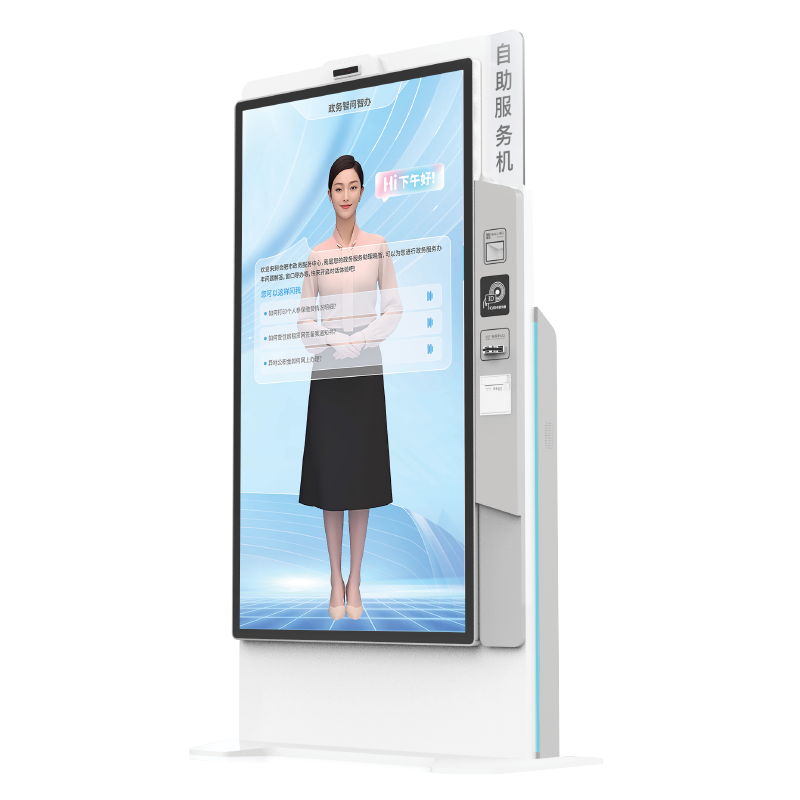
6. Tulevaisuus: tekoäly- ja IoT-perusteiset itsekorjaavat kioskit
Tulevaisuudessa hallituksen kioskien : näiden koneiden autonomisuus kasvaa entisestään. Internet of Things (IOT ) -antureiden avulla nämä koneet ovat nyt "itsekorjaavia". Jos sisäinen tulostin jumittuu, kioskilla on usein mahdollisuus kääntää rullia takaisinpäin ja poistaa jumitus automaattisesti. Jos tämä ei onnistu, se lähettää välittömästi huoltotyötilauksen paikalliselle teknikolle ja ohjaa käyttäjät lähimmälle toimivalle pisteelle.
Lisäksi, Ennakoiva analytiikka mahdollistavat kaupunginsuunnittelijoiden nähdä, mitkä palvelut ovat suosituimpia. Jos tietyssä kaupunginosassa sijaitseva kiosk havaitsee 300 %:n nousun "liikekäynnistyslupahakemusten" määrässä, kaupunki voi reagoida esimerkiksi lisäämällä resursseja tai avaamalla alueelle paikallisen toimiston.
Lopullinen arvio
Se hallituksen kioskien on modernin kansalaisyhteiskunnan osallistumisen viimeinen keino. Se kunnioittaa kansalaisten aikaa, suojaa heidän henkilöllisyyttään ja tarjoaa mukavuuden tason, joka aiemmin oli varattu yksityiselle sektorille. Kun ymmärtää laitteiston ja noudattaa yllä esitettyjä yksinkertaistettuja prosesseja, voit muuttaa tunteja kestävän byrokraattisen turhautumisen minuutteja kestäväksi digitaaliseksi tehokkuudeksi.
Sisällysluettelo
- Miten käyttää hallituksen kioskeja tehokkaiden julkisten palvelujen tarjoamiseen: kattava opas 24/7 digitaaliseen hallintoon
- 1. Nykyaikaisen viranomaiskioskin rakenne
- 2. Vaihe vaiheelta: Yleisimmin käytettyjen julkisten palvelujen suorittaminen
- 3. Korkean arvon palvelut: Mitä voit itse asiassa tehdä?
- 4. Miksi kioskit ovat tehokkaampia: näkökulma vuodelle 2026
- 5. Ammattimaisia vinkkejä maksimaalisen tehokkuuden saavuttamiseksi
- 6. Tulevaisuus: tekoäly- ja IoT-perusteiset itsekorjaavat kioskit
- Lopullinen arvio